Apunkagames Official Site – Games Download For PC Apunkagames Official Site — Discover detailed PC game guides, accurate system requirements, screenshots, and verified official download links for top Windows games.

Core Keeper is an enchanting, sandbox survival adventure game developed by Pugstorm and published by Fireshine Games. Players find themselves trapped deep within an ancient, subterranean cavern after being mysteriously drawn to a strange, glowing artifact known as the Core. Whether exploring solo or teaming up with friends in online co-op, your primary objective is to survive, unravel the secrets of this underground world, and power up the central relic to discover a way home.
The gameplay loops perfectly blend mining, crafting, farming, and intense combat within a massive, procedurally generated world. You begin by harvesting basic resources like wood and copper to build a base, grow crops, cook meals, and forge advanced equipment. As you venture deeper into distinct underground biomes, you will encounter dangerous monsters, hidden treasures, and colossal bosses that require strategic preparation and skilled dodging to defeat, yielding rare loot that unlocks new technological tiers.
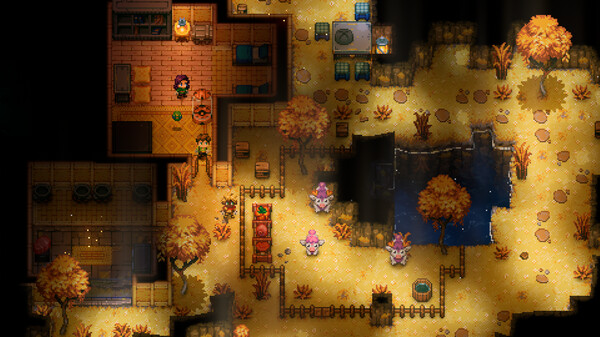
With its gorgeous, atmospheric pixel art and a soothing yet dynamic soundtrack, the game creates a deeply immersive subterranean experience. A flexible skill system rewards you with permanent stat bonuses simply for performing actions like running, mining, or gardening, letting you naturally specialize your character. Offering a satisfying mix of cozy base building and thrilling exploration, it keeps players hooked as they light up the dark, expansive caverns.
Before downloading make sure that your PC meets minimum system requirements
Minimum System Requirements
- OS: Windows 10 64-bit
- Processor: Intel Core i5-2300
- Memory: 8 GB RAM
- Graphics: GeForce GTX 460
Screenshots

How to Install Core Keeper?
- Download: Get the installer only from the official developer or a verified store.
- Run Setup: Double-click the official .exe file and follow the prompts.
- Default Path: Install to the recommended folder to ensure proper system permissions.
- Update: Run the game launcher to download any official security patches.
- Launch: Open the game via the official desktop shortcut.