Apunkagames Official Site – Games Download For PC Apunkagames Official Site — Discover detailed PC game guides, accurate system requirements, screenshots, and verified official download links for top Windows games.

Tales of Graces f Remastered is a beautifully enhanced version of the classic action RPG developed by TOSE CO., LTD. and published by Bandai Namco Entertainment. The emotional story takes place on the lush planet of Ephinea, where three childhood friends—Asbel, Richard, and Sophie—make a fateful promise to protect each other. Years later, their home becomes a battleground for a massive power struggle, forcing the reunited heroes to face an even greater threat that puts their bonds of friendship to the ultimate test.
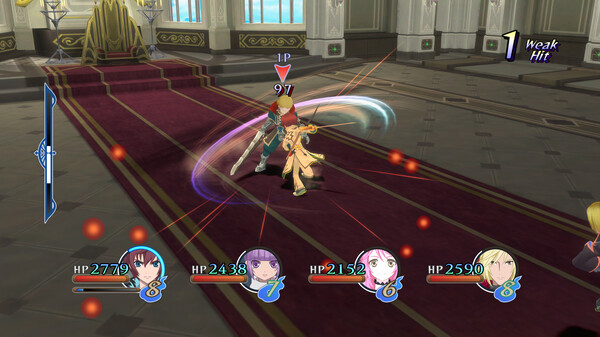
This updated remaster introduces excellent quality-of-life features that make the classic gameplay smoother and much more accessible for modern players. The game now includes helpful functions like auto-save, various cutscene skip options, and the ability to turn enemy encounters completely off while exploring the world. Alongside the noticeably improved graphics, players can dive into a deep character progression system with over one hundred equipable titles that unlock powerful skills and permanent stat bonuses through combat.
Additionally, the collection includes the “Lineage and Legacies” after-story scenario, which delivers a substantial epilogue set six months after the main game’s conclusion. The combat remains a fan-favorite highlight, utilizing the dynamic Style Shift Linear Motion Battle System that lets players fluidly switch between two unique fighting styles in real time. It stands out as an action-packed JRPG that beautifully reminds players of the enduring strength found in determination and teamwork.
Before downloading make sure that your PC meets minimum system requirements
Minimum System Requirements
- OS: Windows 10 / Windows 11
- Processor: Intel Core i3-8100 / AMD Ryzen 3 3100
- Memory: 4 GB RAM
- Graphics: AMD Radeon HD 7770
- DirectX: Version 11
- Storage: 12 GB available space
Screenshots

How to Install Tales of Graces f Remastered?
- Download: Get the installer only from the official developer or a verified store.
- Run Setup: Double-click the official .exe file and follow the prompts.
- Default Path: Install to the recommended folder to ensure proper system permissions.
- Update: Run the game launcher to download any official security patches.
- Launch: Open the game via the official desktop shortcut.