Apunkagames Official Site – Games Download For PC Apunkagames Official Site — Discover detailed PC game guides, accurate system requirements, screenshots, and verified official download links for top Windows games.

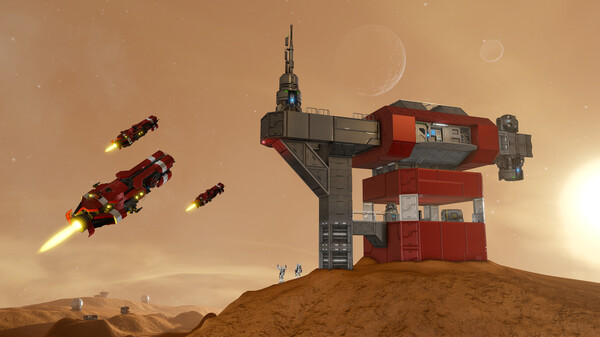
Space Engineers is a stellar, open-world voxel sandbox game released in 2019 that focuses heavily on engineering, construction, and survival in outer space. Developed and published by Keen Software House, the game drops players into a realistic, volumetric physics environment where they can build, maintain, and pilot massive space stations, planetary outposts, and a limitless variety of spacecraft.
For PC players, the core gameplay loop revolves around a robust, grid-based building system. You construct everything from small mining vessels to colossal capital ships by combining structural blocks, thrusters, conveyor networks, and programmable logic units. Players must manage life support, refine raw materials gathered from asteroids or planetary crusts, and automate production lines. The game features a complex, realistic physics engine where everything in the world can be completely deformed, damaged, or destroyed during high-speed kinetic collisions or intense orbital dogfights.
Visually, the custom VRAGE 2.0 engine handles immense rendering scales, seamless planet-to-space transitions, and fully destructible environments with impressive fidelity. It features a thriving Steam Workshop community packed with thousands of player-made blueprints and total-conversion mods. The digital installation requires 35 GB of available storage space on your hard drive or solid-state drive (SSD) to begin engineering.
Before downloading make sure that your PC meets minimum system requirements
Minimum System Requirements
- OS: Windows 10 / 11 64-bit
- Processor: Intel i5 3.0 GHz or higher
- Memory: 8 GB RAM
- Graphics: Geforce 750/Radeon R9 270X
- DirectX: Version 11
- Storage: 35 GB available space
Screenshots

How to Install Space Engineers?
- Download: Get the installer only from the official developer or a verified store.
- Run Setup: Double-click the official .exe file and follow the prompts.
- Default Path: Install to the recommended folder to ensure proper system permissions.
- Update: Run the game launcher to download any official security patches.
- Launch: Open the game via the official desktop shortcut.