Apunkagames Official Site – Games Download For PC Apunkagames Official Site — Discover detailed PC game guides, accurate system requirements, screenshots, and verified official download links for top Windows games.

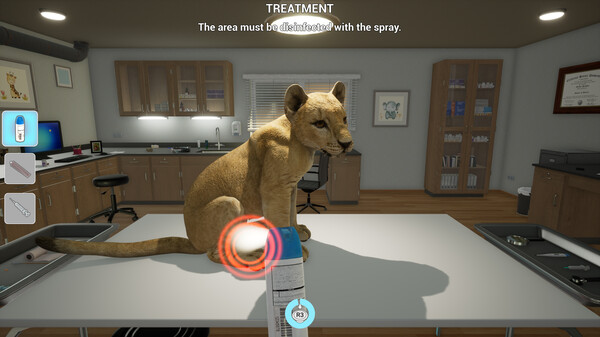
My Life Zoo Vet is a casual simulation game developed by Raylight Games Srls and published by Markt+Technik Verlag GmbH. Released in March 2025, the title places players into the shoes of a dedicated veterinarian responsible for managing the health of diverse animals within a vast park. From towering elephants and roaring lions to cute baby penguins, players must explore extensive outdoor enclosures and stables on foot or by vehicle to reach their patients.
The core gameplay centers around diagnosing and treating over 100 distinct ailments using a variety of examination tools. Aspiring vets can completely customize their character before packing their medical bags to tackle daily emergencies. Along with interactive care routines, the game features informative educational boards packed with interesting real-world facts about each exotic species, aiming to provide an accessible learning experience alongside its medical simulation loops.
Despite its family-friendly concept, the game has received a mostly negative reception from the Steam community. Players frequently critique the mechanics for being overly simplistic and highly repetitive, noting that most medical tasks rely heavily on basic point-and-click actions or holding down a mouse button without engaging mini-games. Additionally, some users have expressed disappointment with the utilization of artificial intelligence for background environmental assets and the presence of early gameplay bugs.
Before downloading make sure that your PC meets minimum system requirements
Minimum System Requirements
- OS: Windows 11 / 10 / 8 / 7
- Processor: Dual-Core: 2Ghz
- Memory: 4 GB RAM
- Graphics: Intel HD Graphics 630
- DirectX: Version 10
- Storage: 4.81 GB available space
Screenshots

How to Install My Life Zoo Vet?
- Download: Get the installer only from the official developer or a verified store.
- Run Setup: Double-click the official .exe file and follow the prompts.
- Default Path: Install to the recommended folder to ensure proper system permissions.
- Update: Run the game launcher to download any official security patches.
- Launch: Open the game via the official desktop shortcut.