Apunkagames Official Site – Games Download For PC Apunkagames Official Site — Discover detailed PC game guides, accurate system requirements, screenshots, and verified official download links for top Windows games.

Echoes of Yi Samsara is a dark martial arts action game that deeply integrates traditional Chinese culture and folklore. Developed by Runmeng, the game places players into the shoes of the Sword Saint’s first disciple. Setting off on a high-stakes adventure under the divine Jianmu Tree, your main objective is to defeat formidable opponents and unravel a deep conspiracy to save the world from an impending global catastrophe.
The core gameplay centers on a highly challenging, fast-paced combat system heavily inspired by the “Souls-like” genre. Players must master a precise rhythm of rapid offensive strikes and defensive deflections. Successfully executing timely parries builds up an enemy’s momentum bar until their defenses completely shatter, allowing you to unleash devastating, fatal counterattacks using traditional Chinese martial arts, including Tai Chi, sword techniques, and spears.
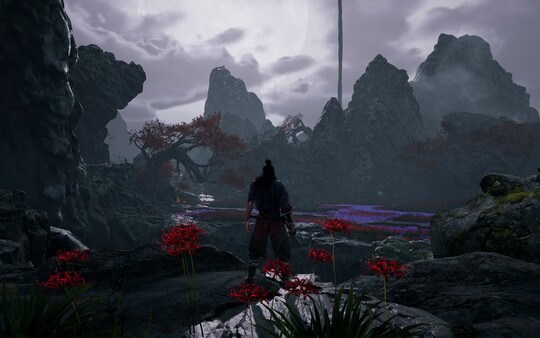
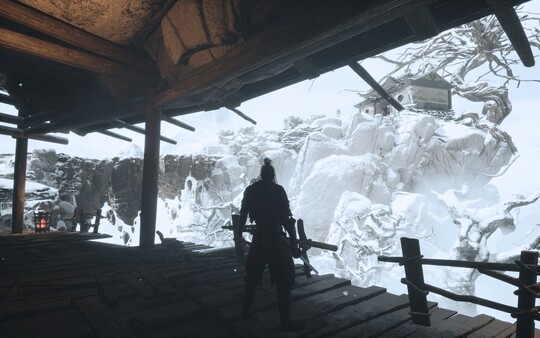
Beyond the intense combat, the game heavily showcases Eastern cultural heritage through its artistic presentation. The levels and boss designs prominently feature historical elements like the Sanxingdui ruins, traditional folklore, and Peking opera aesthetics. This atmospheric journey is further elevated by a unique musical score that beautifully blends traditional Chinese instrumentation—such as the suona, pipa, and guqin—with heavy percussion to create a deeply immersive experience.
Before downloading make sure that your PC meets minimum system requirements
Minimum System Requirements
- OS: Windows 10/11 64-bit
- Processor: Intel Core i3-2100 | AMD FX-6300
- Memory: 8 GB RAM
- Graphics: NVIDIA GeForce GTX 1060
- DirectX: Version 11
- Storage: 30 GB available space
Screenshots
How to Install Echoes of Yi Samsara?
- Download: Get the installer only from the official developer or a verified store.
- Run Setup: Double-click the official .exe file and follow the prompts.
- Default Path: Install to the recommended folder to ensure proper system permissions.
- Update: Run the game launcher to download any official security patches.
- Launch: Open the game via the official desktop shortcut.