Apunkagames Official Site – Games Download For PC Apunkagames Official Site — Discover detailed PC game guides, accurate system requirements, screenshots, and verified official download links for top Windows games.

Lost Eidolons Veil of the Witch is a compelling turn-based tactical RPG that serves as a rogue-lite spin-off to the original Lost Eidolons. Developed by Ocean Drive Studio and published by Kakao Games, the narrative plunges players onto a mysterious, isolated island after their character dies and is resurrected by a cryptic witch. Stripped of your memories, you must form a ragtag band of survivors, battle relentless hordes of the undead, and attempt to break the island’s eternal death loop.
For PC players, the game delivers an addictive mechanical loop that fuses grid-based tactical combat with rogue-lite progression. Unlike the sprawling army management of its predecessor, this title focuses on a tighter, fast-paced squad of up to five heroes. Every run features procedurally generated paths where you choose your battles, encounter random events, and acquire unique perks that fundamentally alter your abilities. Dying resets your immediate run progress, but rewards you with persistent currency to permanently upgrade your skills, classes, and weapon masteries back at the base camp.
Visually, the game showcases an expressive, cel-shaded art direction that scales beautifully across modern systems. The digital installation requires 15 GB of available storage space on an SSD.
Before downloading make sure that your PC meets minimum system requirements
Minimum System Requirements
- OS: Windows 10 / 11 x64
- Processor: Intel Core i5-3570 or AMD equivalent
- Memory: 8 GB RAM
- Graphics: GeForce GTX 960 or AMD equivalent, 4 GB VRAM
- DirectX: Version 11
- Storage: 15 GB available space
Screenshots
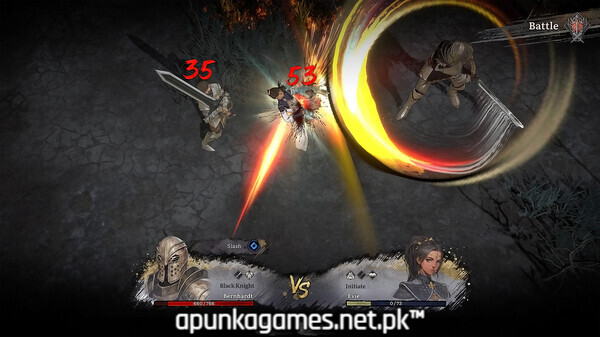
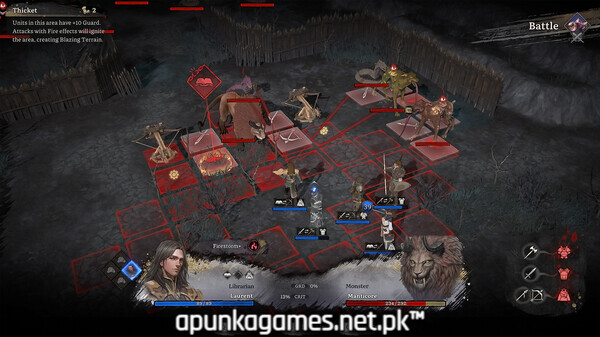
How to Install Lost Eidolons Veil of the Witch?
- Download: Get the installer only from the official developer or a verified store.
- Run Setup: Double-click the official .exe file and follow the prompts.
- Default Path: Install to the recommended folder to ensure proper system permissions.
- Update: Run the game launcher to download any official security patches.
- Launch: Open the game via the official desktop shortcut.